
Ask Gemini, Keep Revising: How I Use Chrome's AI Side Panel With My MugUp Decks
A card raises a question the card can't answer. Opening a new tab costs you the session. Here's the two-window revision setup I use instead — and the two rules that stop it turning into cheating.
A note on how one of us actually revises — MugUp is built and run by a developer who studies with it too.
You know that moment mid-revision when a card raises a question the card itself can't answer? You flip it, read the answer, and think — wait, but why? Or: how does this connect to the thing I learned last week?
For the longest time my move was to open a new tab, search around, land on a forum thread, follow a link off that, and come back to my deck fifteen minutes later having lost every bit of momentum. Sometimes I didn't come back at all.
The tab is what kills the session
It's worth being precise about what goes wrong there, because it isn't the curiosity — the curiosity is the good part. It's the navigation. You leave the thing you were doing, you land somewhere with its own gravity, and the cost of returning quietly grows the longer you're gone.
So the fix isn't "stop asking questions mid-revision." It's "answer them without leaving."
First, ask the card
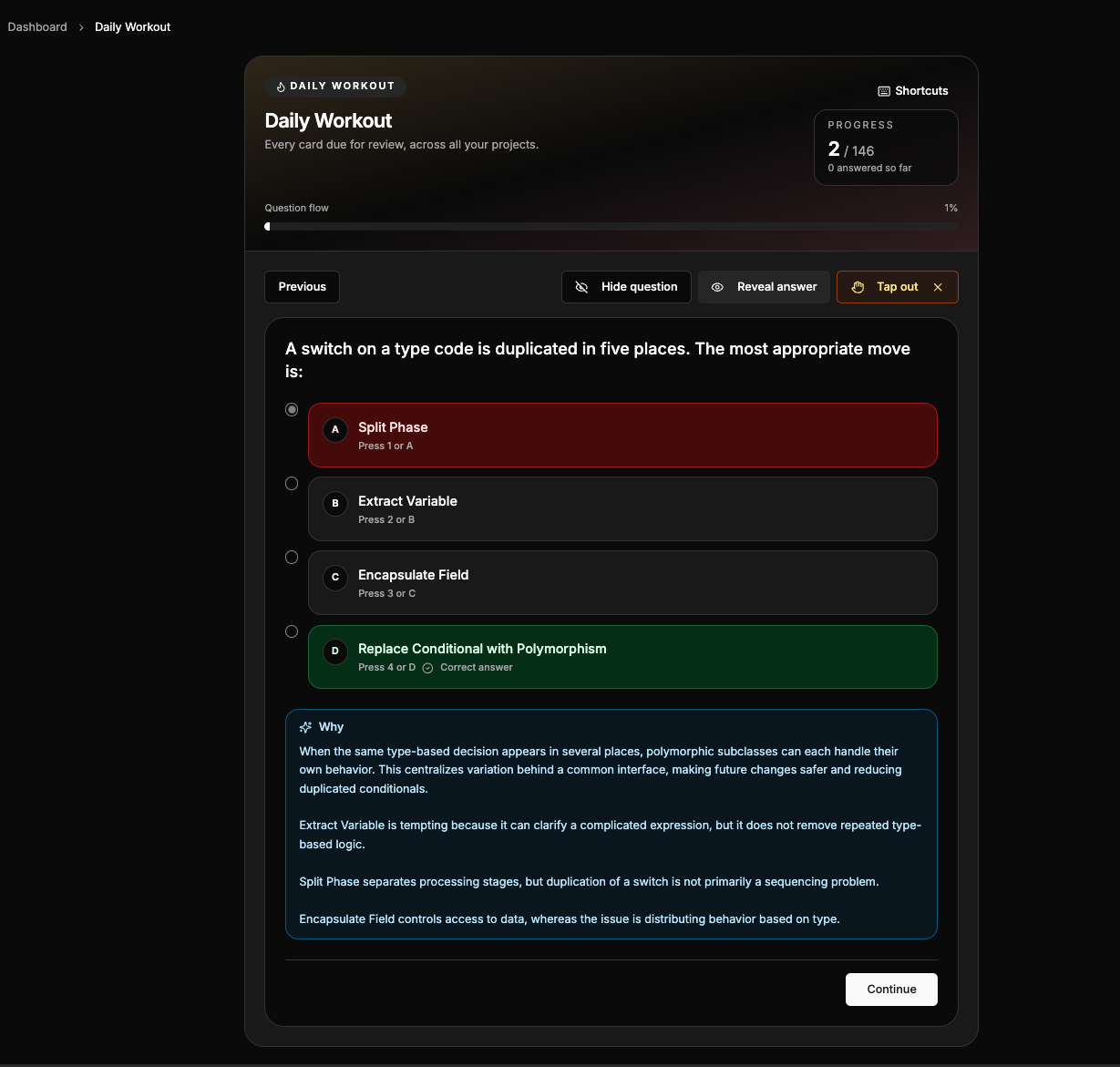
Before I go anywhere else, there's a step I skip too often and shouldn't: MugUp will explain its own answers. After a question resolves, you can ask why the right answer is right, and the explanation comes back against that question and your material rather than the internet's general opinion of the topic. On the free tier that's ten a day, and answers other people have already asked for are cached and don't count — Pro removes the limit.
That handles the most common case, which is "I don't see why this answer beats the one I picked" — the explanation covers the idea behind the right answer and gives a line on each wrong option and why it was tempting. It's grounded, it's one click, and it doesn't move me off the card.
Then the side panel, for what a card can't hold
The other kind of question is bigger than the card. How does this relate to the thing from last week? What's the intuition here? Give me a worse version of this so I can see the difference. No explanation attached to a single question is going to do that well.
That's where I keep Chrome's built-in Gemini panel open beside the session. The deck stays on screen, I ask the question in the panel, and because it's a conversation rather than a one-off search I can keep pushing — explain that more simply, give me an example, how is this different from X. Two or three turns and it usually clicks. Then I close the panel and I'm still on the card I was on.
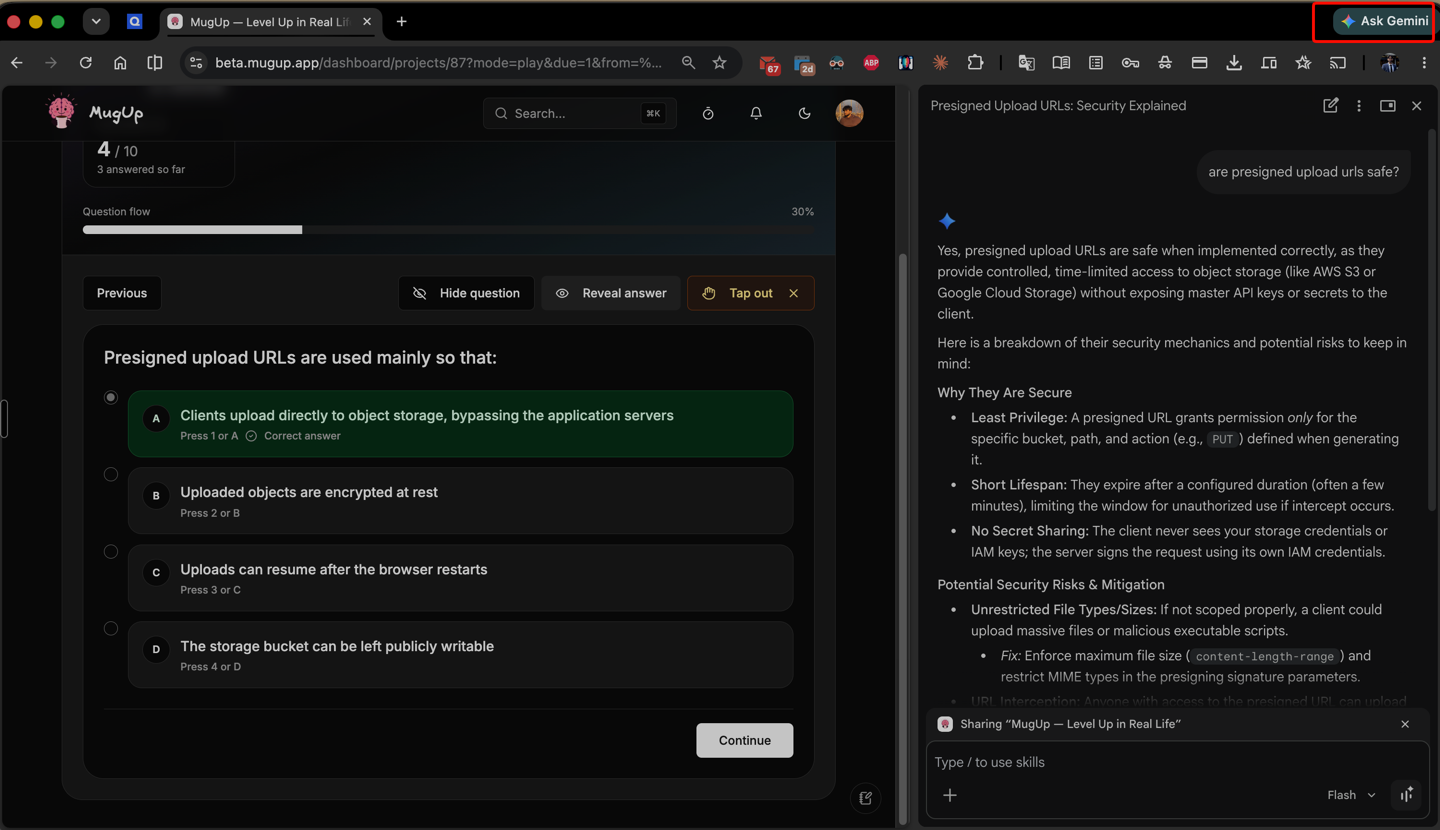
The whole point is in that screenshot: the session is still there. Two panes, one question answered, no tab opened and no rabbit hole entered.
Two rules, or it stops being studying
Attempt the retrieval first. Always. The struggle is not a bug in flashcards, it's the entire mechanism — reaching for an answer and failing is what makes the next attempt stick. Asking an AI before you've tried to recall turns active recall into reading with extra steps. My rule is that the panel doesn't open until after the reveal, and only when the problem is I don't understand this, not I forgot this. Forgetting is fine. Forgetting is what the scheduling is for — the card comes back.
Treat the answer as a starting point, not a verdict. It's excellent for understanding a question better and for framing what you're actually asking — but a confident paragraph is not a citation, and these tools are fluent in a way that has nothing to do with being right. Anything medical, legal or financial, or anything you'd repeat in an exam answer, gets verified against a real source before I let it settle as fact. If being wrong would cost you something, the panel is where you start, not where you stop.
Setup notes, and the honest caveats
- You may not have it yet. Gemini in Chrome is still rolling out and isn't available in every country, on every account, or on mobile. Nothing about this workflow is Chrome-specific though — any AI chat in a second window, or a split screen on a laptop, does the same job. The requirement is side by side, not a particular vendor.
- A phone works, badly. Two panes is the whole idea, so this is a desktop habit. On a phone you're back to tab-switching, which is the thing we're avoiding.
- What you type leaves your machine. It's someone else's model in that panel. Don't paste anything confidential into it — an employer's material, a client's, anything under an exam NDA.
- ⌘K gets you back. If you do end up somewhere else, the command palette (⌘K, or Ctrl+K) searches your own projects, topics and games by title, so returning to the deck is one shortcut rather than three clicks of navigation.
The bigger idea
Revision doesn't have to be a solo, static activity anymore. A deck plus a conversation in the same window is the closest thing I've found to studying with a patient tutor who never gets bored of my follow-ups — with the caveat, which matters, that this tutor is sometimes confidently wrong and you're the one who has to notice.
Used in the right order — recall first, explanation second, conversation third — it doesn't dilute the work at all. It just removes the fifteen minutes I used to lose every time I got curious.
Try it on tonight's session
Start a deck, or clone a ready-made one, open it beside whatever AI chat you have, and hold to the one rule: attempt the card before you ask about it.
The takeaway
The question you have mid-revision is the best question you'll have all day, because it arrived at the exact moment you cared about the answer. Don't spend your session going to find it. Answer it in the next window, verify it if it matters, and get back to the cards.
Related: let AI find the gaps you didn't know you had and why quizzing yourself is the best way to study.
Turn this into a game
Type a topic and MugUp's AI builds quizzes, flashcards, and matching games in seconds. Free to start.